> ## Documentation Index
> Fetch the complete documentation index at: https://help.uninote.ai/llms.txt
> Use this file to discover all available pages before exploring further.
# フォルダを編集・削除する
フォルダ名やメンバーの編集、不要なフォルダの削除ができます。
***
### 手順:フォルダを編集する
1. [ミーティング]画面を開きます。
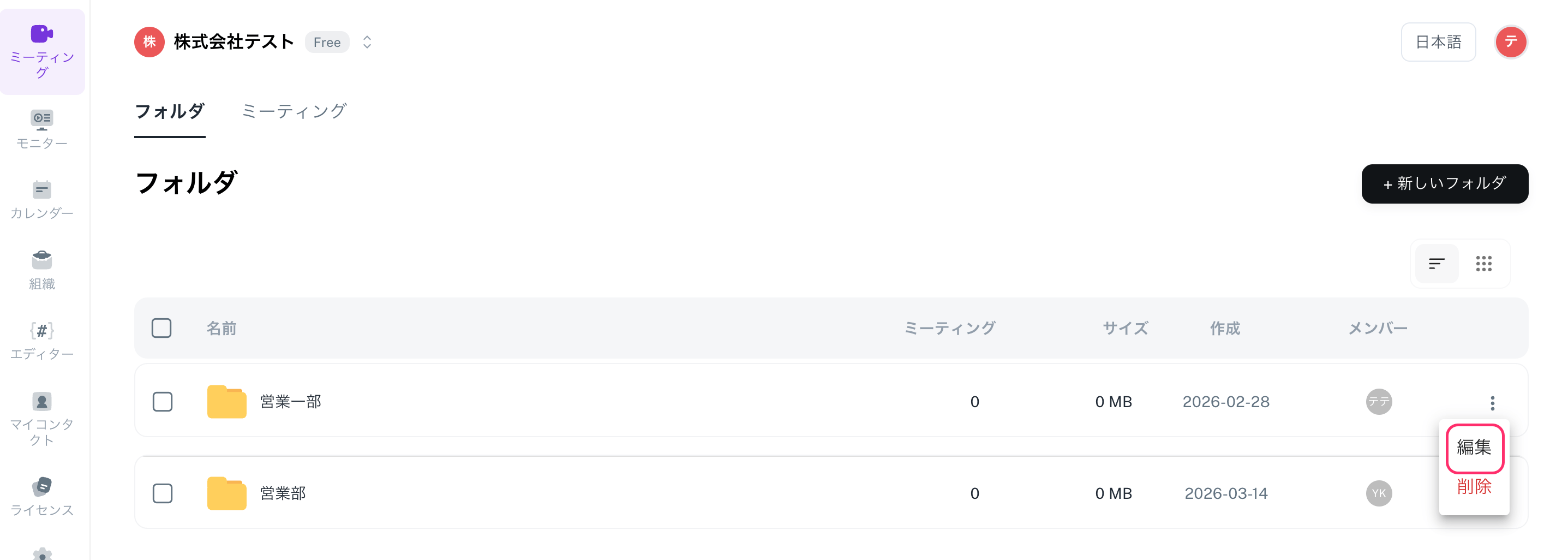
2. 編集したいフォルダにカーソルを合わせ、[…](メニュー)をクリックします。
3. [編集]を選択します。
4. フォルダ名やフォルダのメンバーを変更して更新します。\\
***
### 手順:フォルダを削除する
**フォルダを削除しても、フォルダ内のミーティングは削除されません**。ミーティングは「フォルダなし」の状態で残ります。
1. [ミーティング]画面を開きます。
2. 削除したいフォルダにカーソルを合わせ、[…](メニュー)をクリックします。
3. [削除]を選択して完了です。
 ***
### 関連ページ
* [フォルダ(ミーティングの置き場)を作成する](/ja/forudamtingunokiwosuru)
***
### 関連ページ
* [フォルダ(ミーティングの置き場)を作成する](/ja/forudamtingunokiwosuru)